
Your page exists, but Google has not indexed it
You launch an important service page, add it to your sitemap and wait. Search Console still shows “Discovered, currently not indexed”. It is easy to assume the website is broken, or that you need another round of expensive content changes.
Start with a smaller question: what evidence do you have about this exact URL? A report label, a successful browser visit and a live inspection test describe different things. Keeping them separate helps you choose a useful fix instead of changing everything at once.
Quick answer: confirm the reported URL, check whether it can be fetched and indexed, review its internal links and purpose, then monitor the result. There is no setting that guarantees inclusion. This original DMB guide was prepared on 27 October 2026; its checklist is practical advice, not a claim about a client result.
What does this Search Console status mean?
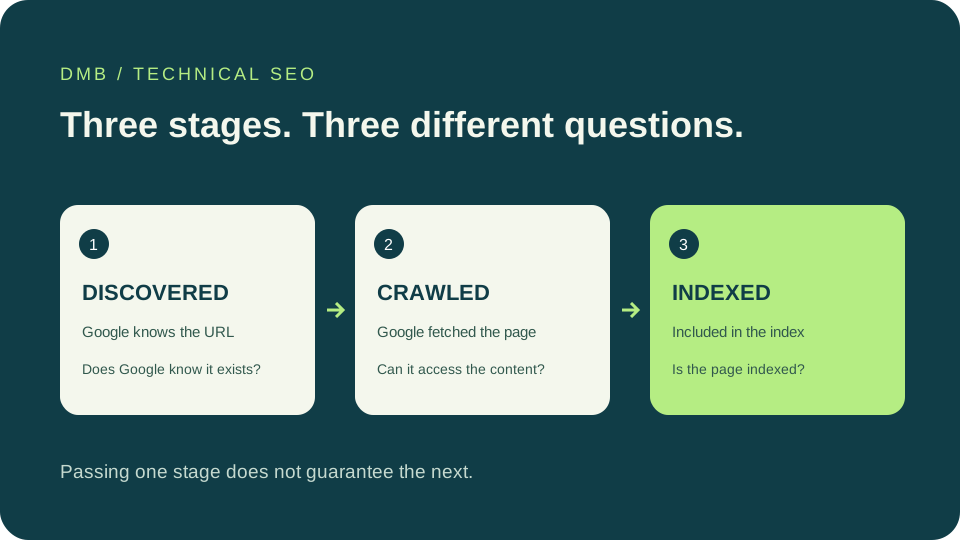
Google’s Page indexing documentation describes this status as a URL Google knows about but has not yet crawled. It is different from a page that has been crawled and then left out of the index. A missing last-crawl date is consistent with the first situation.
The label alone does not establish a penalty, prove that your writing is poor or identify a specific server fault. Avoid treating it as a diagnosis of the whole business. Inspect representative URLs and look for a shared pattern.
Official reference: Google’s Page indexing report. Record the report date as well as the URL, since the stored report and the page you see today may reflect different moments.
1. Choose the correct URL before testing
Copy one affected URL directly from Search Console. Keep its protocol, hostname, path and any language folder intact. A check of the homepage does not explain what happens to a translated service page or an old address that now redirects.
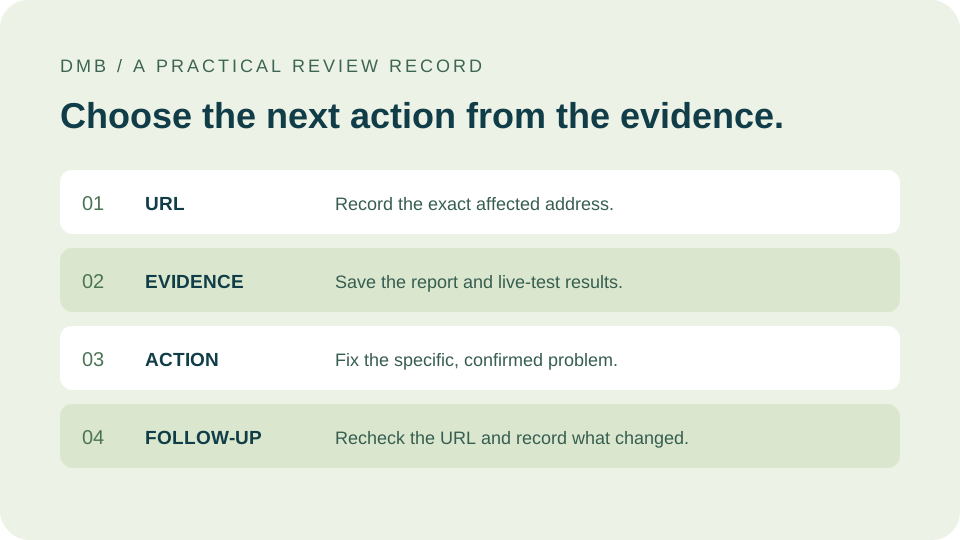
Create a simple record: reported URL, intended canonical URL, current response, internal linking page, inspection result and next action. Give the action an owner. For a small site, ten carefully reviewed priority pages can reveal more than an export nobody has time to interpret.
Choose pages that matter to customers. A current service page needs attention before an obsolete campaign page. A duplicate URL may not need to be indexed at all. Decide what the URL should do before deciding how to fix it.
For a practical way to connect this page to the rest of your website, follow our internal linking guide for service websites. It explains topic groups and destination choices with examples.
2. Use the live test without confusing it with indexing
URL Inspection provides stored index information and a separate way to test the current page. Use Test live URL when checking a recent change. Review the available response details and rendered output, rather than relying only on what your own browser shows.
A successful live test is not confirmation that the page is already indexed. The test also cannot settle every issue represented in the indexing report. Save both results with their dates so that a later review does not compare an old crawl with a newly changed page.
Official reference: Google’s URL Inspection documentation. In your notes, use precise labels such as “live test passed” and “indexed status not confirmed”. That wording prevents a technical check from becoming a misleading result claim.
3. Check technical barriers in a sensible order
Our suggested sequence starts with availability. Does the intended page return a normal successful response, or does it redirect, fail or require a login? Then review robots rules, page-level indexing instructions and the canonical destination. Check the actual response, including headers, because a visible page can carry instructions you do not notice on screen.
If a canonical points elsewhere, ask whether that choice is intentional. If a robots rule blocks access, investigate why it exists before removing it. Customer accounts, internal search results and other private or low-value areas may need restrictions.
Do not disable security controls simply to improve an audit score. Ask your developer to identify the specific request that fails and compare it with authorised inspection evidence. Fix the narrow problem and retest the same URL.
4. Make the page easy to find inside your website
A useful page should have a natural place in the site. Link to it from the relevant service, topic or country page using words that explain its destination. Check that the link works in the rendered page and leads to the intended address.
Then review the sitemap. Keep important canonical URLs in it and avoid filling it with redirects, removed pages or addresses you do not want indexed. Google explains that a sitemap helps discovery but does not guarantee crawling or inclusion.
Official reference: Google’s sitemap overview. Our recommendation is to treat the sitemap as a supporting map. It should agree with the navigation and public content, rather than becoming the only route to a page nobody can find.
If your page is available but you are also trying to understand AI discovery, read our guide to Google Preferred Sources and AI visibility. Indexing checks and AI source selection answer different questions.
5. Give each page a reason to exist
Read the page as a prospective customer. Does it answer a distinct question? Does it explain your actual offer, delivery process and next step? Replacing a country or city name in the same paragraphs rarely gives the reader much new information.
For a regional page, useful differences may include language support, working arrangements, genuine coverage and customer questions. Do not invent an office or a local team to make the page appear more relevant. Our international service-page guide explains that decision in more detail.
Google’s people-first guidance encourages useful, reliable information and clear authorship. Read the official helpful-content guidance. Improving a page for readers is worthwhile, but it should not be presented as a guaranteed indexing switch.
A worked example: twelve regional URLs
Illustrative example, not a DMB case study: a business finds twelve regional URLs in the report. Eight describe genuine service coverage but have no contextual links. Three repeat another page without adding a useful distinction. One redirects to an old address.
The actions differ. Add appropriate links to the eight useful pages. Review whether the three duplicates should be consolidated or developed into distinct resources. Correct the redirect journey and sitemap entry for the remaining address. Rewriting all twelve introductions would miss most of the problem.
Keep a record of each change. If a URL later becomes indexed, that timing alone does not prove which adjustment caused it. Multiple changes and Google’s own processing can make attribution uncertain.
6. Request a recrawl after a meaningful fix
For a small number of important URLs, an authorised Search Console user can request indexing through URL Inspection. For broader changes, maintain the sitemap and sensible internal links. Google warns that requesting a crawl does not guarantee immediate inclusion, or inclusion at all.
Official reference: Google’s guidance on recrawl requests. Record the request date and return to the same URL later. Repeatedly pressing the button is not a substitute for resolving a known issue.
Do not pay for a guaranteed indexing promise. Ask a provider what they will actually inspect, change and report. A credible technical scope should distinguish completed work from outcomes controlled by a search engine.
What should you do next?
Pick one important URL, record the evidence and make the smallest justified improvement. Review the result before expanding the same change across the website. If many pages share a template, compare an affected page with a working one.
For a starting point, our free website audit reviews public signals. Diagnosis of Search Console status still needs access to the relevant property and URL evidence. Our technical SEO service explains the commercial scope.
Editorial note: prepared with AI assistance using the official sources linked here. The checklist and example are DMB’s interpretation. Publication does not mean this article, or any reader’s page, is confirmed indexed.
If the page is already appearing in search but few people visit, use our Search Console impressions and clicks review. That is a different diagnosis from a URL that has not been indexed.